This listing has not been migrated to FAB by the seller. It is only available to use from your Vault in the Epic Games Launcher.Learn more about Fab
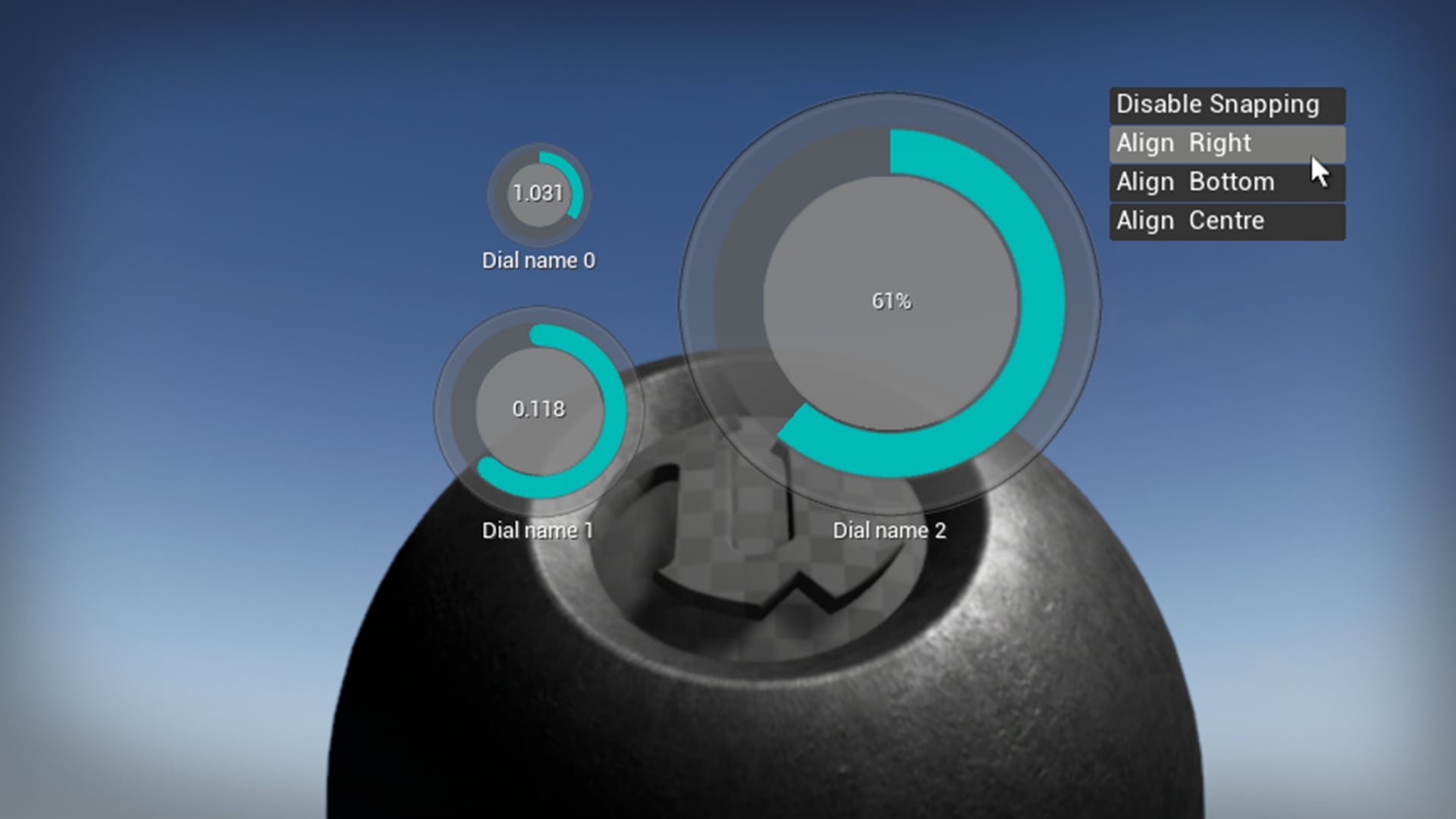
SnapUI - Dial Snapplet
Snapplets are template graphs that you 'cut and paste' into your own existing blueprints.
- Supported Platforms
- Supported Engine Versions4.12
- Download TypeComplete ProjectThis product contains a full Unreal Engine project folder, complete with Config files, Content files and .uproject file, which can be used as a template to create a new project.
Description
Reviews
Questions
SnapUI is a partial 'cut & paste' GUI solution for Unreal Engine 4 comprising of interactive graphical components called 'snapplets'. A Snapplet is a 'snappable applet' (e.g. Dial) that you can position and align during play for easy layout design. SnapUI is developed for the Windows 7 platform and utilities standard mouse and keyboard input. Snapplets are ideal for providing interactive options for architectural and debugging purposes.
1. After Creating the SnappletDial template project download:
SnapUI_InputMapping.ini & SnapUI_InputMapping.READ.ME.FIRST.ini and place the files into the SnappletDial\Config\ folder. (SnapUI_InputMapping.READ.ME.FIRST.ini contains a note regarding existing action mappings).
2. Open SnappletDial in UE4
3. Go to Edit->Project Settings:Input and import Snapplet_Dial\Config\SnapUI_InputMapping.ini.
4. Press play to confirm the template project runs as expected (the first dial should change the GlobeThing object's material.
You are now ready to add snapplets to your own projects. Visit www.3si.co.uk/snapui.html and watch the 'Dial Snapplet' tutorial.
Note-1:
The video tutorials refer to a project folder called 'Snapplet_Dial'. Snapplet_Dial is the same project as the one you have just created, i.e. SnappletDial. (The underscore has been removed).
Note-2:
The video tutorials refer to a folder in the Content Browser called \Game\SnapUI. In your template project the folder has been moved to \Game\SnappletDial\SnapUI.
1. After Creating the SnappletDial template project download:
SnapUI_InputMapping.ini & SnapUI_InputMapping.READ.ME.FIRST.ini and place the files into the SnappletDial\Config\ folder. (SnapUI_InputMapping.READ.ME.FIRST.ini contains a note regarding existing action mappings).
2. Open SnappletDial in UE4
3. Go to Edit->Project Settings:Input and import Snapplet_Dial\Config\SnapUI_InputMapping.ini.
4. Press play to confirm the template project runs as expected (the first dial should change the GlobeThing object's material.
You are now ready to add snapplets to your own projects. Visit www.3si.co.uk/snapui.html and watch the 'Dial Snapplet' tutorial.
Note-1:
The video tutorials refer to a project folder called 'Snapplet_Dial'. Snapplet_Dial is the same project as the one you have just created, i.e. SnappletDial. (The underscore has been removed).
Note-2:
The video tutorials refer to a folder in the Content Browser called \Game\SnapUI. In your template project the folder has been moved to \Game\SnappletDial\SnapUI.
Technical Details
Number of blueprints:2
• Customisable 2D Dial (rotary) UI component
• Realtime positioning of dial snapplets in PIE or standalone exe.
Positioning (dragging) can be disabled for a release build.
• Auto saving and re-loading of last known dial positions and values from .ini file between runtime sessions.
• Simple and customisable setup.
• Easily add up to 30 dial snapplets on screen.
• Easily access dial snapplet output values to drive variables in other blueprints.
• Live step-by-step tutorial videos covering setup, configuration and usage examples.
• 100% Blueprint implementation.
Platforms:
WINDOWS
• Customisable 2D Dial (rotary) UI component
• Realtime positioning of dial snapplets in PIE or standalone exe.
Positioning (dragging) can be disabled for a release build.
• Auto saving and re-loading of last known dial positions and values from .ini file between runtime sessions.
• Simple and customisable setup.
• Easily add up to 30 dial snapplets on screen.
• Easily access dial snapplet output values to drive variables in other blueprints.
• Live step-by-step tutorial videos covering setup, configuration and usage examples.
• 100% Blueprint implementation.
Platforms:
WINDOWS